Step 1: Portal Overview & System Announcements
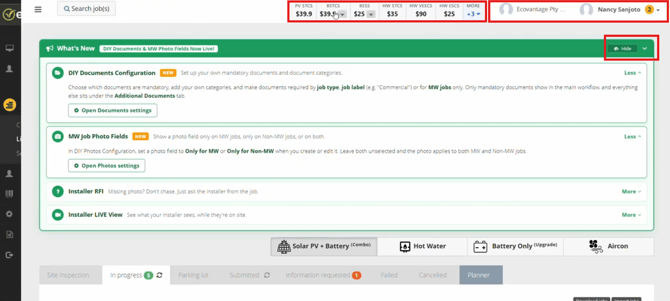
- When you first log in to Bridge Select, you will land on the primary job list page.
- Along the top navigation bar, view current certificate types and pricing, your company name, and your active user profile.
- The green What's New banner displays system updates and latest announcements. Click Hide on the right if you wish to minimise this section.
Step 2: Switch Between Technology Scheme Tabs
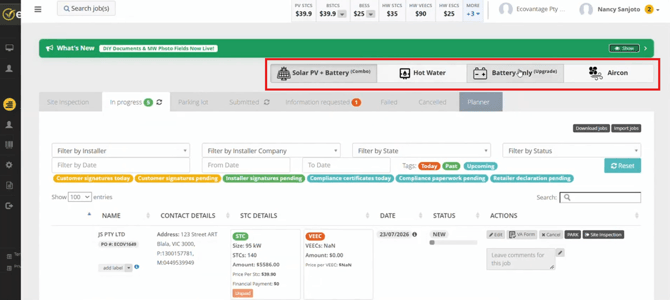
Bridge Select categorises jobs by technology type. Across the top banner, select the tab relevant to your installation:
- Solar PV + Battery (Combo): View and manage combined solar and battery jobs.
- Hot Water: Click to access heat pump and hot water installations.
- Battery Only (Upgrade): Switch here to view dedicated standalone battery upgrade jobs.
- Aircon: Access air conditioning and space heating activities.
Step 3: Filter Jobs by Workflow Status
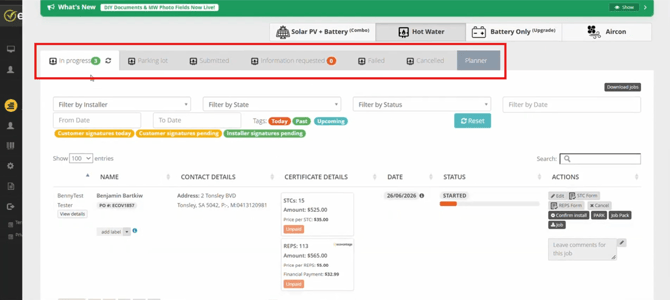
Within each technology section, use the horizontal status bar to track jobs through each stage of the submission process:
- Site Inspection / In progress
- Parking lot
- Submitted
- Information requested / Failed / Cancelled
- Planner
You can also apply search filters by Installer, State, Status, and Date Range to quickly locate specific records.
Step 4: Utilise the Main Sidebar Menu
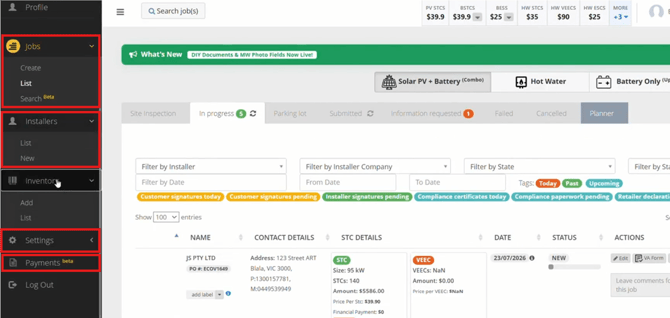
The dark navigation menu on the left provides access to all primary management modules:
- Jobs: Expand this section to Create new jobs, view your full List, or run an advanced Search.
- Installers: Manage on-site technicians and assigned accreditation details.
- Settings: Configure company preferences, custom forms, and integrations.
- Payments: Track RCTIs (Recipient Created Tax Invoices) and remittance advice.
Note: For day-to-day operations, you will primarily use the Jobs, Installers, and Settings modules. Payment updates and remittance advice are typically issued and communicated directly via email.